![Image]()
![Image]()
![Image]() Reuploaded from Nexus.
Reuploaded from Nexus.
We have a thread of tutorials of tutorials & resources for the toolkit here
Overview
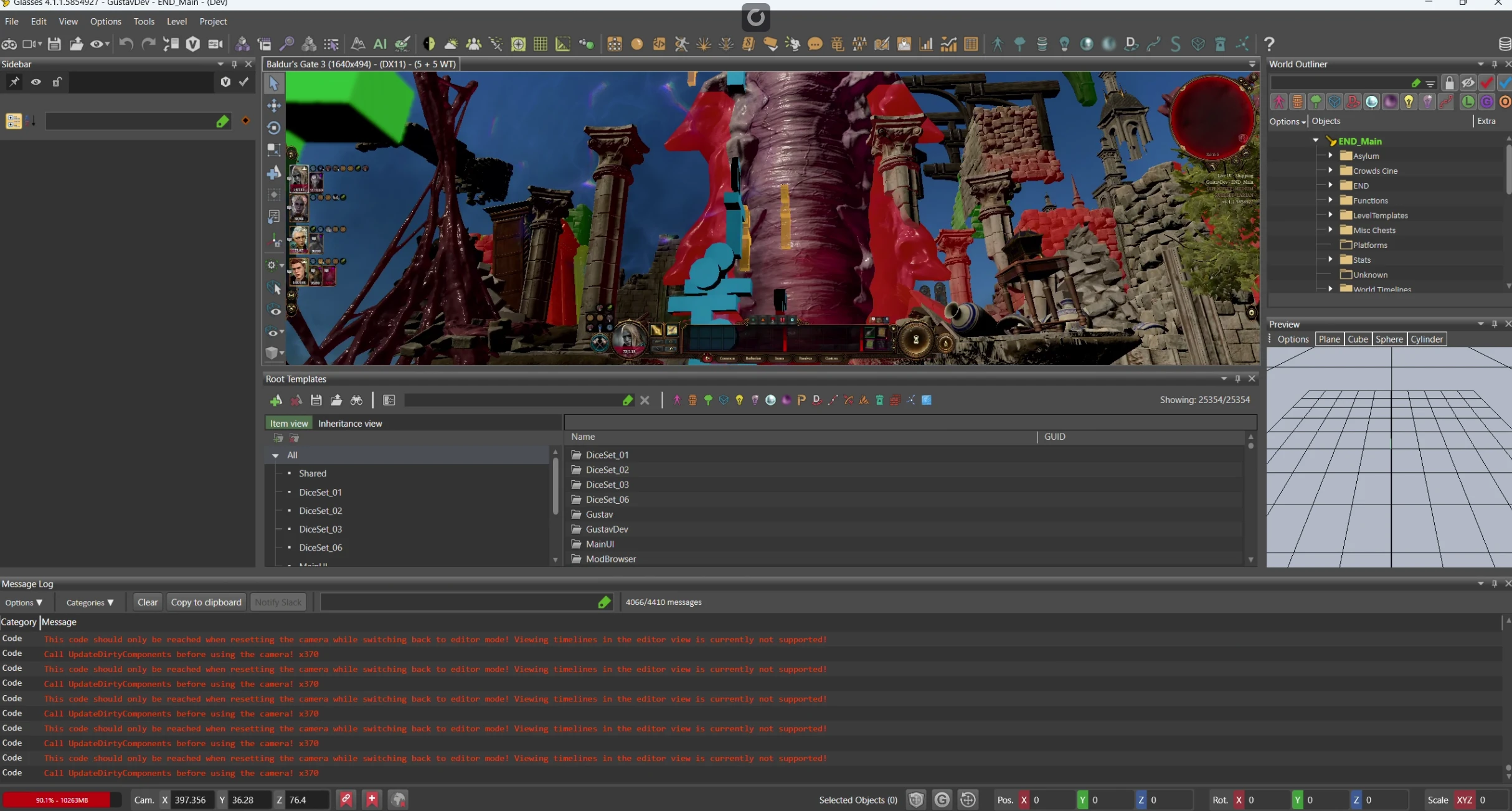
MoonGlasses is a tool that unlocks the full power of the BG3 editor. This tool allows for level creation, dialogue, cinematic timelines, new combat encounters, as well as everything the locked version has.
Furthermore, it allows for new extensions and features to be created.
Some of the new things you can do:
- Easily modify dialog nodes (auto-saving and managing your translation files and their versions).
- Add voiceovers to dialog nodes.
- Manage voiceover speakers.
- Unlock the power of cinematic dialogs by enabling the Timeline Editor (currently, only "Full Copper" generation is available).
- Create your own quests
Downloads
Old Versions
► Installation Instructions + Manually Patching DLL steps for the old, non-MoonGlasses version
Installation Instructions
- Backup your EditorFramework.dll in SteamLibrary/steamapps/common/Baldurs Gate 3 Toolkit.
ㅤ
- Download EditorFramework.dll from this page.
ㅤ
- Move the new EditorFramework.dll into SteamLibrary/steamapps/common/Baldurs Gate 3 Toolkit.
ㅤ
- Start the toolkit.
ㅤ
- If successful, you should see (Dev) at the top of the toolkit window.
ㅤ
Manually Patching Your DLL
- Download and install dnSpyEx.
ㅤ
- Open EditorFramework.dll with dnSpyEx.
ㅤ
- Navigate to EditorFramework.IO.FileAccess.
ㅤ
- Remove all restricted folders from Setup. Optionally, clear out the function bodies for AddRestrictedFolder and AddIgnoredFolder.
ㅤ
- Modify the HasDeveloperPermissions function to return true, and IsRestrictedFile to return false.
ㅤ
- Go to WorkflowService and set both IsLevelEditingAllowed and IsDialogAndStoryEditingAllowed to return true.
ㅤ
- Go to File -> Save Module... and save the new DLL file.
ㅤ
Changelog
► Show Spoiler
v1.2
- Custom Minimap Renderer UI: Replaces the built-in world map renderer with a custom UI. Enhances minimap rendering speed, eliminates flashing, and disables the default shroud during Play Mode.
- Improved Injection Method: Offers more control over Glasses and simplifies installation.
- Interface Enhancements:
- Dark mode is now consistent across multiple built-in editors, improving layout performance.
- Story Editor now features an adjusted color palette for dark mode and quick-access buttons for rebuilding stories.
- Asset and Resource Management:
- Asset Browser now includes label filters based on runtime templates, with new categories for Items and Characters.
- Management of WIP labels has been streamlined.
- Virtual texture support has been added.
- Miscellaneous Enhancements:
- MoonGlasses version is now displayed on the splash screen.
- Terrain Brush Preview shows terrain textures in the preview window (manual action might be needed for some users).
- Sentry integration enables automated crash reporting (with user consent via the configuration file).
- Disabling saves has improved loading times (saves can be re-enabled via configuration).
- A dedicated MoonGlasses Icon menu organizes less common actions.
- Bug Fixes: Resolved the issue with the "Move to Another Mod" feature in the Resource Manager.
0.2.0
- Fixes the dialog saving/loading issues due to the localization module.
- Adds changes to two additional dll files.
0.1.4
- Fixes missing model resource import options (.GR2)
- Fixes missing audio resource import options (.WAV)
0.1.3
- Fixes issue with saving not working for the dialog editor.
0.1.2
- Fixes issue with resource importing and prompt so that its clear where files need to go. Previously it was unclear where resources needed to be put in the BG3 directory to allow them to be successfully imported.
- The default editor copies files automatically to a mod specific folder, but that functionality appears to be intentionally disabled in the developer version. Files need to be moved to the proper directory manually to be imported successfully. The folder is usually "Baldurs Gate 3/Data/Public/<mod-name>*", but the prompt should specify if the location is elsewhere.
0.1.1
- Fixes issue with localization server and resource importing.
0.1.0
- Moving files from the \Mods\Editor to just \Mods is no longer required.
- Resource file paths are corrected
0.01
- Initial level editor changes
Installation Instructions
- Download and extract the files
ㅤ
- Run unlock.bat, this unblocks all the .dll files that windows complains about
ㅤ
- Extract Steamworks file and MoonGlasses Folder into BG3 Editor root folder.
ㅤ
- Run the editor. If it crashes, the .dlls may be blocked, still. Right click them and go to properties. On the bottom make sure it doesn't say they're blocked.
ㅤ
- If you're still crashing, please uninstall the editor, make sure the folder is empty, reinstall it, then try again.
ㅤ
NOTE: You do NOT need SiegFre's unlocking tool to make MoonGlasses work. This is a separate entity.


 Moonglasses - BG3 Unlocking Tool
  Source Code