Copyright Disclaimer:
Copyright Disclaimer Under Section 107 of the Copyright Act in 1976, Allowance is made for "Fair Use" for purposes such as criticism, comment, news reporting, teaching, scholarship, and research. Fair use is a use permitted by copyright statute that might otherwise be infringing. Non-profit, educational or personal use tips the balance in favor of fair use.
All rights and credit go directly to its rightful owners. No copyright infringement intended.
Overview
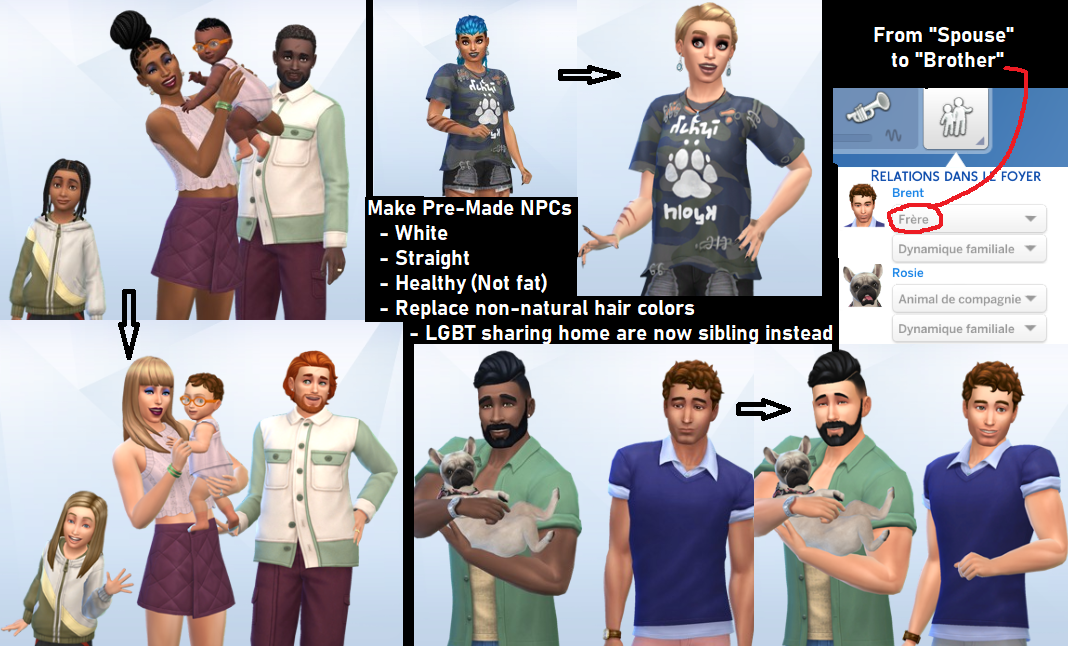
Replace DEI quotas of the game the Sims 4 with the explicitly intend of parodying and criticizing the DEI ideology presented in the game by making all the he Npcs non-diverse. As such parodying the political ideology of Diversity, Equity and Inclusion which seeks to promote diversity at all costs.
Downloads
| Files | Version | Type | Description |
|---|---|---|---|
 DEI Remover DEI Remover | 1.0.0 | Main | ! Got report that it no longer work after the 26.02 2025 update ! Replacement of Pre-Made NPCs require a new game. |
 MC Command Center Modules by Deaderpool MC Command Center Modules by Deaderpool | 2024.2.0 | Optional | An useful mod to further tweak the game and fully remove LGBTs. |
MC Command Center Settings
This mod require you to check the box "Script Mods Allowed" in the game Options.
Once installed;
1. Launch the game and click on a computer.
2. Select the "MC Command Center" bubble and follow the path to the relevant options;
In MC Pregnancy;
- Adoption Settings > Same Sex Adoption Percent = 0
- Marriage Sim Selection > Flag Gender Preference = Enabled
- Marriage Sim Selection > Use Gender Preference = Enabled
- Pregnant Sim Selection > Use Gender Preference = Enabled
- Spouse Sim Selection > Same Sex Percentage = 0
- Partner Sim Selection > Same Sex Percentage = 0
In MC Occult;
- Aliens > Abduction Pregnancy Settings > Abduction Pregnancy Genders = Female
- Aliens > Abduction Pregnancy Settings > Pollinator Gender = Male
3. Click on a mailbox - Select the "MC Command Center" bubble and follow the path to the relevant options;
In MC Cheats;
- Sims/NPC Households > Set All Walkstyles > Set the walkstyle options according to gender
The MCC mod touches on many more things, and the settings carry on to all your saves & new games.
So i would recommend taking the time to check the rest of the settings too, and once you are done, to start a fresh new game.
Installation
- First you need to activate mods in game.
- In game, go into "Options"
- In the "Other" tab, check the box "Enable Custom Content and Mods".
- Click "Apply Changes". - Open the "Mods" folder and put the mod in it ;
C:\Users\"Your User Name"\Documents\Electronic Arts\The Sims 4\Mods
Uninstallation
Delete .package files.
The changes made to saved NPCs will remain.
Compatibility
Made and tested for version 1.105.345 with all the Packs & Kits available at the time of the update enabled.
There is many Packs & Kits, feel free to edit the mod to fit your version, the tools needed are;
- Sims4Studio
- TS4HouseholdTool
- TS4Skininator